
This landing page shows how data classification in Microsoft 365 (Word, Excel, PowerPoint and Outlook) affects the handling of files and emails at the University of Helsinki.
The University of Helsinki will introduce a data classification model during 2026. The classification model is strongly based on the national data classification model (only in Finnish), which contains common guidelines on how to classify data and files processed in the activities of higher education institutions, and what restrictions apply to the processing and sharing of classified data. Some modifications have been made to the model adopted by the University of Helsinki compared to the national model, for example in terms of the default category and subcategories.
The classification of data at the University of Helsinki is risk-based, i.e. the higher the risk level of the data, the more protection mechanisms the category contains. Examples of protection mechanisms include access control, restriction of information sharing and encryption of information. For example, depending on the category, the model restricts file sharing outside the organisation, sharing with an anonymous link and the use of data in AI services.
The classification will be available to all University of Helsinki employees by the end of 2026. An employee in this context refers to a person working for the University of Helsinki under both an employment contract and any other contract.
- The classification will not be introduced for University of Helsinki students, but they may see category labels in documents and mail from staff.
- Categorisation is organisation-specific, so the categories you select will not be visible to users outside the University of Helsinki. However, any watermarks (1R and 2A) on the document will be visible to external users.
Releases on data classification
- 10.2.2026 sent to staff with the first newsletter by email
- 18.2.2026 first Flamma bulletin on the matter.
- 26.5.2026 main news in Flamma.
- 21.9.2026 Deployment of data classification at the University of Helsinki progresses.
- 6.10.2026 Vice Rector Kai Nordlund: Data classification brings clarity and security to the sharing of information.
Table of contents
- Data classification model
- Categories and their settings
- What information is classified?
- Why is it important to classify information correctly?
- Data classification in email (Outlook)
- Data classification in M365 files (Word, PowerPoint, Excel)
- Data not included in the classification
- Frequently asked questions about data classification
Data classification model
Categories and their settings
Here is a more detailed list of the data categories used at the University of Helsinki, together with their more detailed settings and restrictions. The settings are different for email and files.
Email categories and restrictions
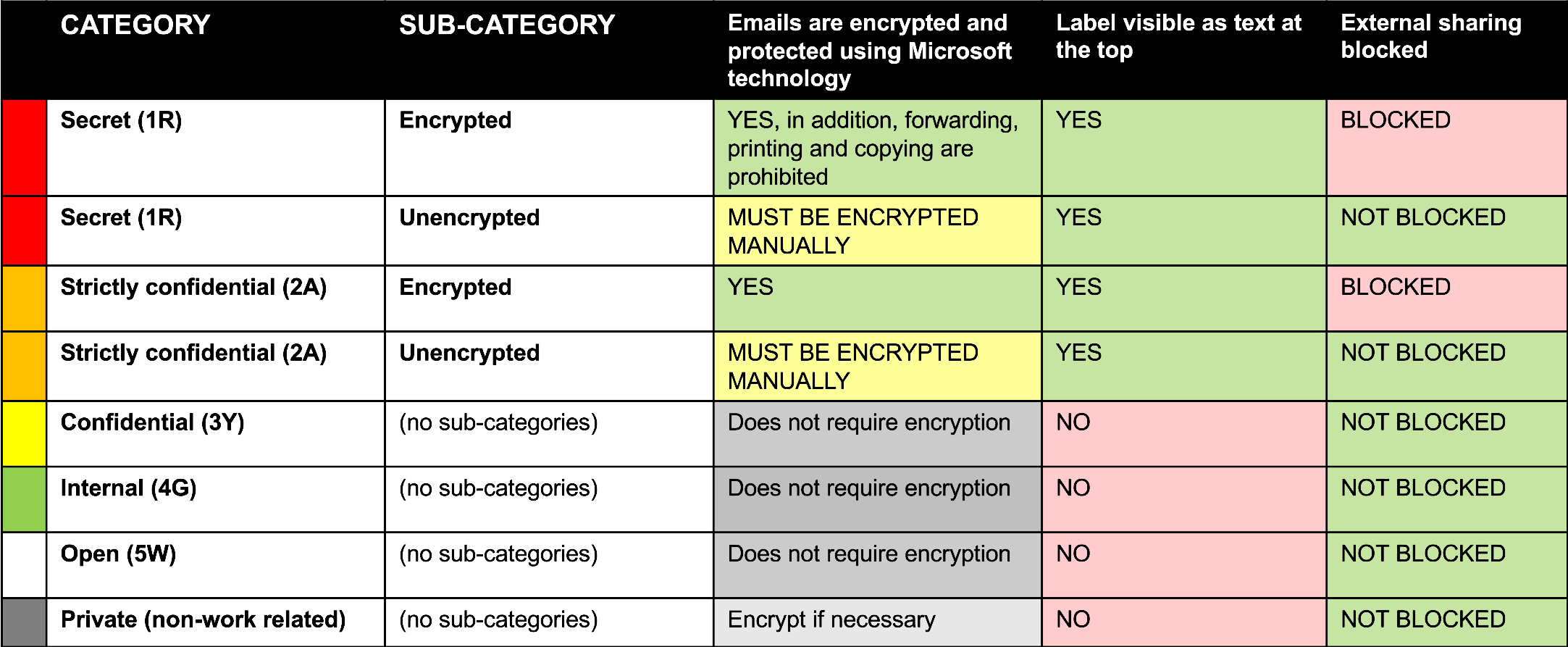
Secret (1R)
- Subcategory: Encrypted
- Emails are encrypted and protected using Microsoft technology. In addition, forwarding, printing and copying are prohibited
- The category appears as text at the top of the email
- External sharing is blocked
- Subcategory: Unencrypted
- You must encrypt the email yourself
- The category appears as text at the top of the email
- External sharing is not blocked
Strictly confidential (2A)
- Subcategory: Encrypted
- Emails are encrypted and protected using Microsoft technology
- The category appears as text at the top of the email
- External sharing is blocked
- Subcategory: Unencrypted
- You must encrypt the email yourself
- The category appears as text at the top of the email
- External sharing is not blocked
Confidential (3Y), Internal (4G) and Open (5W)
- Does not require encryption
- The category does not appear as text at the top of the email
- External sharing is not blocked
Private (non-work related)
- Emails should be encrypted where necessary
- Category does not appear as text at the top of the email
- External sharing is not blocked
File categories and restrictions
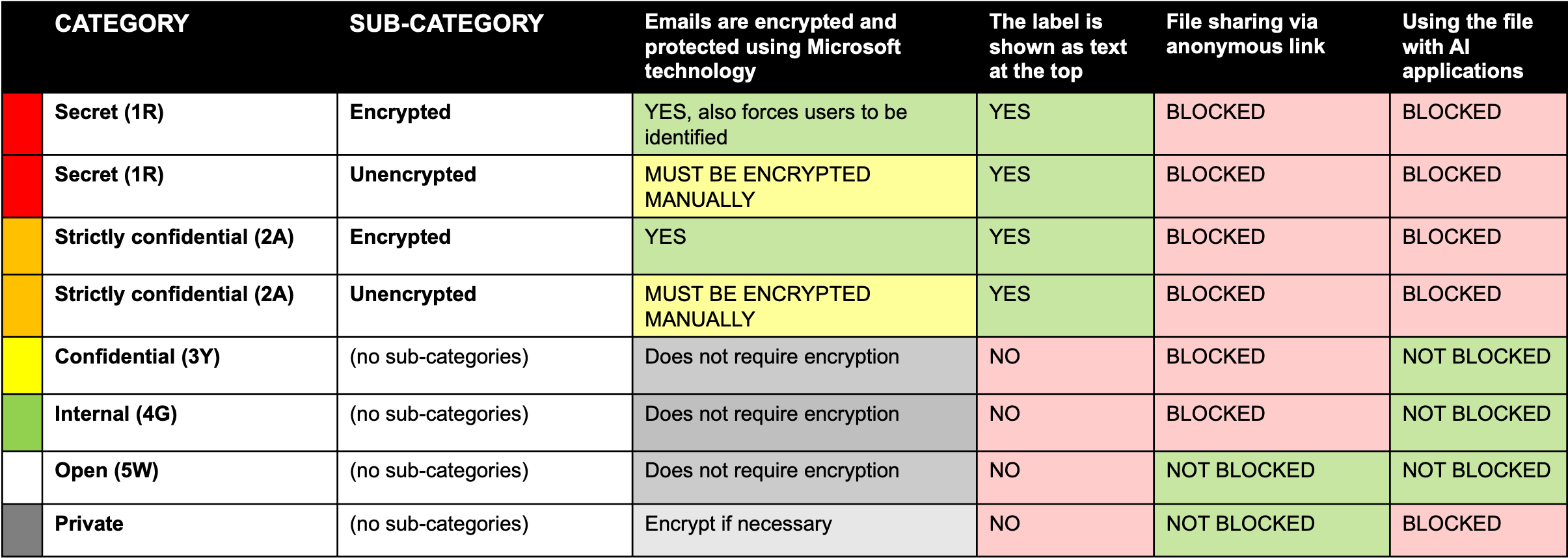
Secret (1R)
- Subcategory: Encrypted
- Files are encrypted and protected using Microsoft technology, also forces users to be identified
- The category appears as text at the top of the file
- Sharing the file as an anonymous link is blocked
- Access to the file by AI applications is blocked
- Subcategory: Unencrypted
- Encrypt yourself
- The category appears as text at the top of the file
- Sharing the file as an anonymous link is disabled
- Access to the file by AI applications is blocked
Strictly Confidential (2A)
- Subcategory: Encrypted
- Files are encrypted and protected using Microsoft technology
- The category appears as text at the top of the file
- Sharing the file as an anonymous link is blocked
- Access to the file by AI applications is blocked
- Subcategory: Unencrypted
- Encrypt yourself
- The category appears as text at the top of the file
- Sharing the file as an anonymous link is disabled
- Access to the file by AI applications is blocked
Confidential (3Y) and Internal (4G)
- Does not require encryption
- The category does not appear as text at the top of the file
- Sharing the file as an anonymous link is blocked
- The file is not blocked from being used by AI applications
Open (5W)
- Does not require encryption
- The category does not appear as text at the top of the file
- Sharing the file as an anonymous link is not blocked
- File access by AI applications is not blocked
Private (non-work related)
- Use encryption when necessary
- Category not shown as text at top of file
- Sharing the file as an anonymous link is not blocked
- Use of the file by AI applications is blocked
What information is classified?
You must always select a data category when creating a new file or email using M365 tools, or when editing a previously created unclassified file.
The category must always be selected according to the risk level of the data content. If the content changes in such a way that its risk level changes, the class should always be changed to match the data content. The email category can only be selected when sending a message, but the file category can always be changed if necessary when its content is modified.
Why is it important to classify information correctly?
Data classification in email (Outlook)
Every time you send an email, you need to classify the message.
The category of the email should correspond to the risk level of the message content. In addition, the recipient of the message should also be taken into account. The higher risk Encrypted subclasses of the data classification model (e.g. 2A - Encrypted) have predefined encryption and protection mechanisms, which, when used, eliminate the need for additional encryption of the message.
If the message class requires protection, the protection method for the message is chosen according to the recipient. There is a separate guide for more detailed instructions, but here is a brief summary:
- If you are sending a message to be protected to a University of Helsinki employee, Microsoft's encryption in the 2A - Encrypted category will work.
- If you are sending a secure message to any University of Helsinki service address, such as the IT Helpdesk (helpdesk@helsinki.fi), select the 2A - Unencrypted (not recommended) category under the Sensitivity menu. Encrypt the email separately with Deltagon security (i.e. Securemail, add .s after the recipient address). For more detailed instructions on how to use Securemail, see the separate instructions.
- If you are sending a secure message to anyone outside the university, select 2A - Unencrypted (not recommended) under the Sensitivity menu and encrypt the email separately with Microsoft 365 security. For more detailed instructions on Microsoft 365 encryption, see the separate instructions.
Note! Data classified as category 1R is not recommended to be processed in email as a matter of principle. However, the protection mechanisms for email messages classified as 1R work in the same way as for class 2A, which was used as an example in the situations above.
Read more about email classification in separate instructions.
Data classification in M365 files (Word, PowerPoint, Excel)
Whenever you create an M365 file or start editing a file that has not yet been classified in the University of Helsinki, you must assign a data class to the file.
Select a class according to the risk level of the data content. If the content changes in such a way that its risk level changes, the category should always be changed to match the data content.
Read more about file classification in the separate instructions.
Data not included in the classification
Excluded:
- All other file types except M365 environment files (e.g. .docx, .pptx and .xlsx files). The exception is PDF, which, when saved as PDF in e.g. Word with "Save as" or "Export", inherits the class of the original file. Please note, however, that the Print to PDF command does not inherit the class.
- old emails, as the email can only be classified at the time the message is sent.
Frequently asked questions about data classification
Q: Why was the data classification model introduced? Why do I have to classify?
A: Classifying data according to a common model supports the secure and appropriate handling of data and the implementation of laws and regulations governing the activities of higher education institutions. The introduction of a data classification model also supports the security of the university and improves the administration of potential security incidents affecting the university.
Q: How much time does the classification process take?
A: The selection of a category is technically a very quick operation. Choosing a category and considering the risk level of the data may take some getting used to at first, but will become easier with time.
Q: Who will be subject to data classification?
A: The classification will be available to all University of Helsinki employees by the end of 2026. An employee in this context is a person working for the University of Helsinki under both an employment contract and any other contract. For students, the data classification will not be introduced, at least not at this stage.
Q: What are the abbreviations for the categories based on (e.g. 3Y Confidential, 4G Internal, etc.)?
A: The abbreviations are the same as in the national data classification model and refer to the colours of traffic lights: 1R = Red; 2A = Amber; 3Y = Yellow; 4G = Green and 5W = White.
Q: Why is data classification only being introduced in the M365 environment?
A: Although the data classification model will only be introduced in the M365 environment in 2026, development work on data classification will continue beyond this date on other university systems.
Q: Which body or bodies have developed the national data classification model on which the University of Helsinki model is based?
A: The National Coordination Group for the National Data Classification Model (only in Finnish) is responsible for the national data classification model and its further development. The University of Helsinki's model is based on the national model, but with some modifications, for example in terms of the default category and subcategories.
Q: Why is there no default category in the University of Helsinki's data classification model?
A: The aim is that data is classified according to its content and that classification becomes a genuine part of everyone's work. If a file or an email had a predefined choice of category, a large number of users might leave it unchanged without thinking about it. The active selection of a category makes everyone consider, when saving a file or sending an email, what kind of data is involved and what category the content of that data corresponds to.
Q: How do I know how to classify a particular document or document type?
A: A category should always be selected according to the level of risk of the data content. If the content changes in such a way that its risk level changes, the category should always be changed to match the data content. The aim is to collect examples of classification for different documents in the University of Helsinki's data management model during 2026. The choice of category should be considered in teams and with colleagues who deal with similar information in their work. We will develop guidance on other examples as soon as possible. The National Model and its data also provides some examples.
Q: What is the harm in always choosing the highest category to be on the safe side?
A: The category should always be chosen to match the content of the data. If the information is always classified in the highest class, it will be subject to the most stringent security mechanisms and will be more complex to share and handle. In this case, not everyone who would have the right to see the information may have access to it. In the case of public authority documents, labelling the information in the highest classification category for security reasons is also contrary to the Act on the Openness of Government Activities, because the Act contains a presumption of publicity, i.e. not to conceal unless necessary.
Q: How does the information classification model relate to the Public Access Act?
A: The Act on the Openness of Government Activities (Finlex, only in Finnish) applies to public authority documents prepared by or submitted to the University, which are described in the Information Management Model. The Information Classification Model is a risk-based information handling policy that applies to all information handled by the University. The classification of information is based on an assessment of the risk of information falling into the wrong hands. They are therefore not mutually exclusive but are applied in parallel for documents. According to the Publicity Act, public authority documents are in principle public unless they are required by law to be kept secret for necessary reasons. The grounds for secrecy under the Publicity Act must be stated prominently on the document if the document is disclosed under the Act. When a document is the subject of a request for information, its public nature or confidentiality is determined by the Public Access Act, not by its risk category in the information classification model. The name of the category according to the information classification model should therefore be omitted from the document, at least when the document is exported to Riihi or UniSign and in information service responses, as the information classification model does not go beyond the Act on the Openness of Government Activities but is a guideline agreed between universities.
Q: Why do I have to reclassify a message every time I continue the same email conversation?
A: This is due to the phased roll-out. If someone replies to an email and they do not yet have the classification feature enabled, the classification chain is broken. The situation will improve once everyone has the classification feature enabled.
Q: Can I still use email programmes other than Outlook, and if so, how will this new data classification affect them?
A: You can still use other email programmes, but it is not possible to classify emails using software other than Outlook.
This can (at organisation-wide level) lead to a situation where one person sends an unclassified message (not via Outlook) and the recipient does not know which classification it belongs to and, furthermore, ‘has to’ classify it when replying. We therefore recommend using Outlook.
Give feedback
The instructions site of the University of Helsinki's IT Helpdesk helps you with IT-related issues related to your work. Let us know how we can improve our instructions. We greatly appreciate your feedback!
How would you improve these instructions?