
CurreChat is a generative AI tool developed at the University of Helsinki. The service is managed by the University of Helsinki’s Educational Technology Services (OTE). CurreChat has been developed specifically for teaching purposes. The generative AI service recommended for more general use at the University is Microsoft 365 Copilot.
Please note! CurreChat is a service currently under active development, and minor changes to its functionality and user interface may occur from time to time. Temporary service interruptions or malfunctions are possible.
Read more about using generative AI at the University in the separate instructions
You can find CurreChat’s own instructions under the ‘About service’ link on the CurreChat website.
Quick help
Access rights and login
Staff automatically have access to CurreChat. Students primarily use the service via course-specific prompts.
On a university computer, you can access the service directly via single sign-on.
An introduction to CurreChat
CurreChat is an AI service developed at the University of Helsinki specifically for educational use. For non-educational purposes, we recommend Copilot.
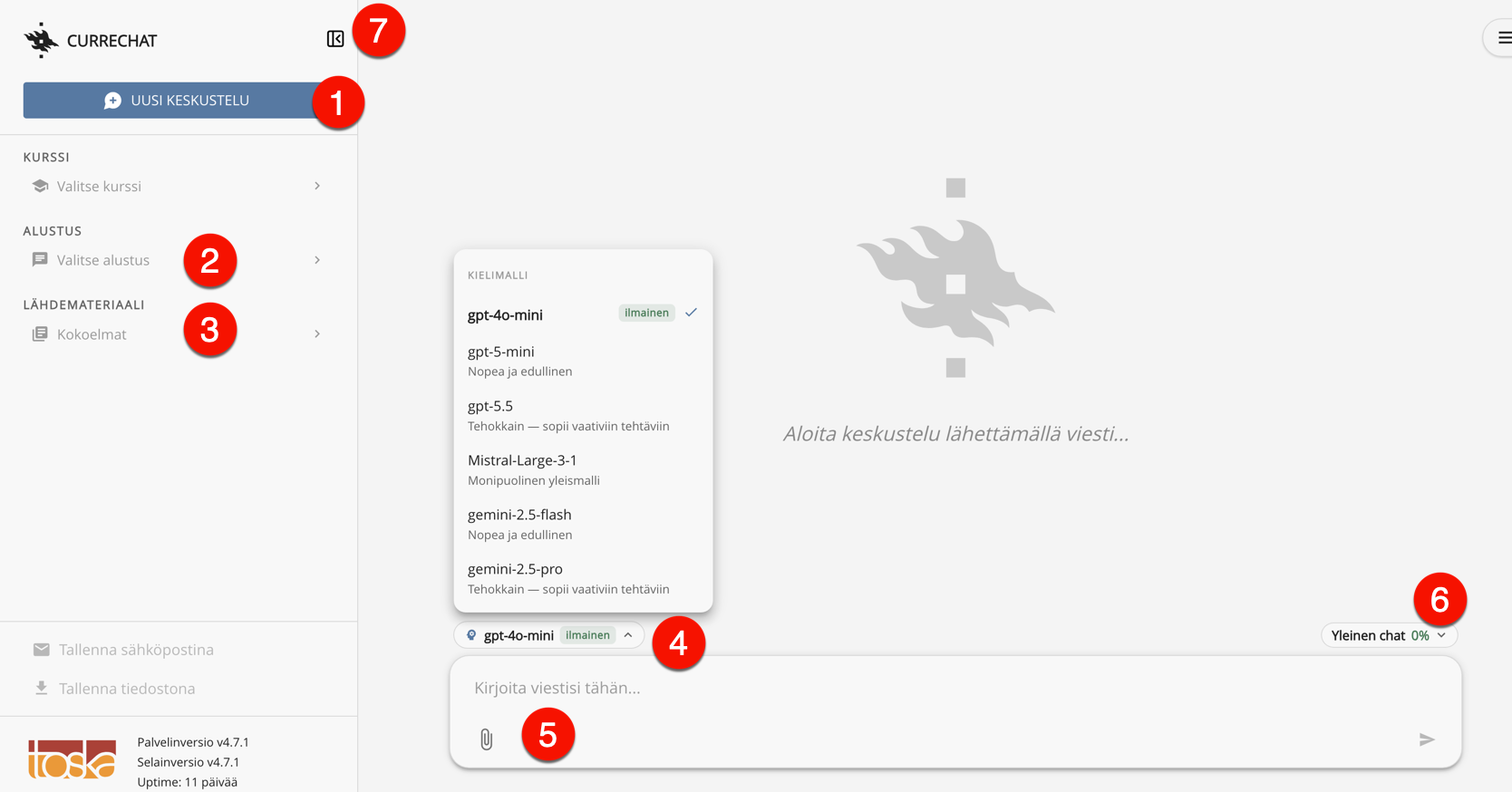
Here is an overview of the tool’s key features:
- New chat – click this button to start a conversation from scratch.
- Prompts: You can create your own prompts and select the one you need for a new discussion, which you can then use as a basis for your discussion. Prompts can be personal, or a teacher can create them for students to use in the courses they teach.
- Source material: Source materials are extensive collections of files that you can attach to prompts.
- Language model: You can choose from a range of language models to suit different needs.
- Chat window: Chat with CurreChat in this window.
- Token usage: Use of CurreChat is limited to a certain number of tokens per week, separately for personal and course-specific use.
- Hide / show sidebar button.
Usage
Enter your question or the task you’ve set for the language model into the prompt. The more clearly you specify the purpose and subject area in the prompt, the more likely you are to achieve the result you want.
You can use the language of your choice (e.g. Finnish) and receive CurreChat’s output in the language you request. So, for example, you can ask a question in Finnish and request a reply in English.
Your own prompts
Prompts allow you to guide the language model’s behaviour. You can create different prompts for personal use, and as a teacher, you can share prompts with students on the courses you teach. Explain what you want to use the chat for and provide more detailed instructions for the language model.
Files and source materials
You can attach a text-based attachment directly to an individual conversation. You can make use of more extensive materials in a conversation by creating a collection of source materials from one or more files. Source materials are always attached to a specific prompt, where you can also instruct the language model on how to utilise the materials in its responses.
Reset when changing the topic
When you change the topic, it is recommended that you reset CurreChat by clicking the New chat button. This saves tokens, and previous prompts and responses will no longer affect the next conversation.
Saving
Conversations are not saved automatically, but you can save a conversation as a file or email it to yourself.
Data security and user responsibilities
CurreChat complies with the EU’s general data protection regulations (GDPR and the EU Data Act). Conversations are private and are not used to train language models.
Confidential or secret information must not be discussed on CurreChat, and users must ensure that they have sufficient rights to process the materials they upload to the service.
Error situations
As this is an online service that draws on multiple sources, server connection errors may occur. If CurreChat freezes or the three dots keep flashing for a while but no response is received, we recommend refreshing the page and trying again after a short while.
Detailed help
Video instruction
Give feedback
The instructions site of the University of Helsinki's IT Helpdesk helps you with IT-related issues related to your work. Let us know how we can improve our instructions. We greatly appreciate your feedback!
How would you improve these instructions?