
This page contains information and instructions for Mac devices at the University of Helsinki.
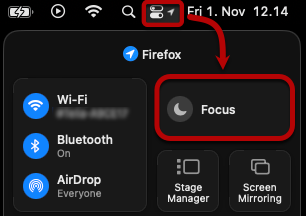
Managed Software Center of the centrally administered UH Mac computers gives regular popup notifications when the operating system or applications require updates. In case you wish to silence these notifications while you are giving a presentation or attending a meeting, for example, you can do so by using the Focus-mode within macOS. Read more on Focus from Apple's own instructions.
Quick help
The manual that comes with your new machine
A new Mac comes with a printed quick start guide to get you started.
PDF updated June 2026.
First login
The first time you log on to the computer, it must be connected to the University of Helsinki network (eduroam or wired network).
- Connect the computer to the HY wired network using the USB-C cable that came with it.
- Log on to the computer using the short form of your username (e.g. rkeskiva or hy12345).
Note! The machine may not let you in on the first try, so try again if, for example, it flashes a black screen after you enter your password.

After the first login, you will be able to log in even if you are away from the computer or if no network is available.
Important note about changing your password!
Because of the Keychain, Mac administration recommends changing the Mac user password according to a separate instructions.
Apple mobile devices
iOS devices (i.e. iPad and iPhone) can be used to access university services such as email, the eduroam network and remote VPN access.
Detailed help
Video instruction
Give feedback
The instructions site of the University of Helsinki's IT Helpdesk helps you with IT-related issues related to your work. Let us know how we can improve our instructions. We greatly appreciate your feedback!
How would you improve these instructions?